

Chatbot suppliers have a simple pitch: put a bot on your website and it will answer questions, capture leads and work through the night. Some businesses do get that. Plenty of others pay a monthly fee for a widget that greets visitors, fumbles the first real question and gets in the way of the phone number people were looking for.
This article gives you a quick way to tell which group you are in, what to check before you add one, and the data protection basics UK businesses need to cover. If you decide you do need one, our AI platforms service builds assistants that answer from your own information and hand over to a person cleanly.
Do you need an AI chatbot on your website?
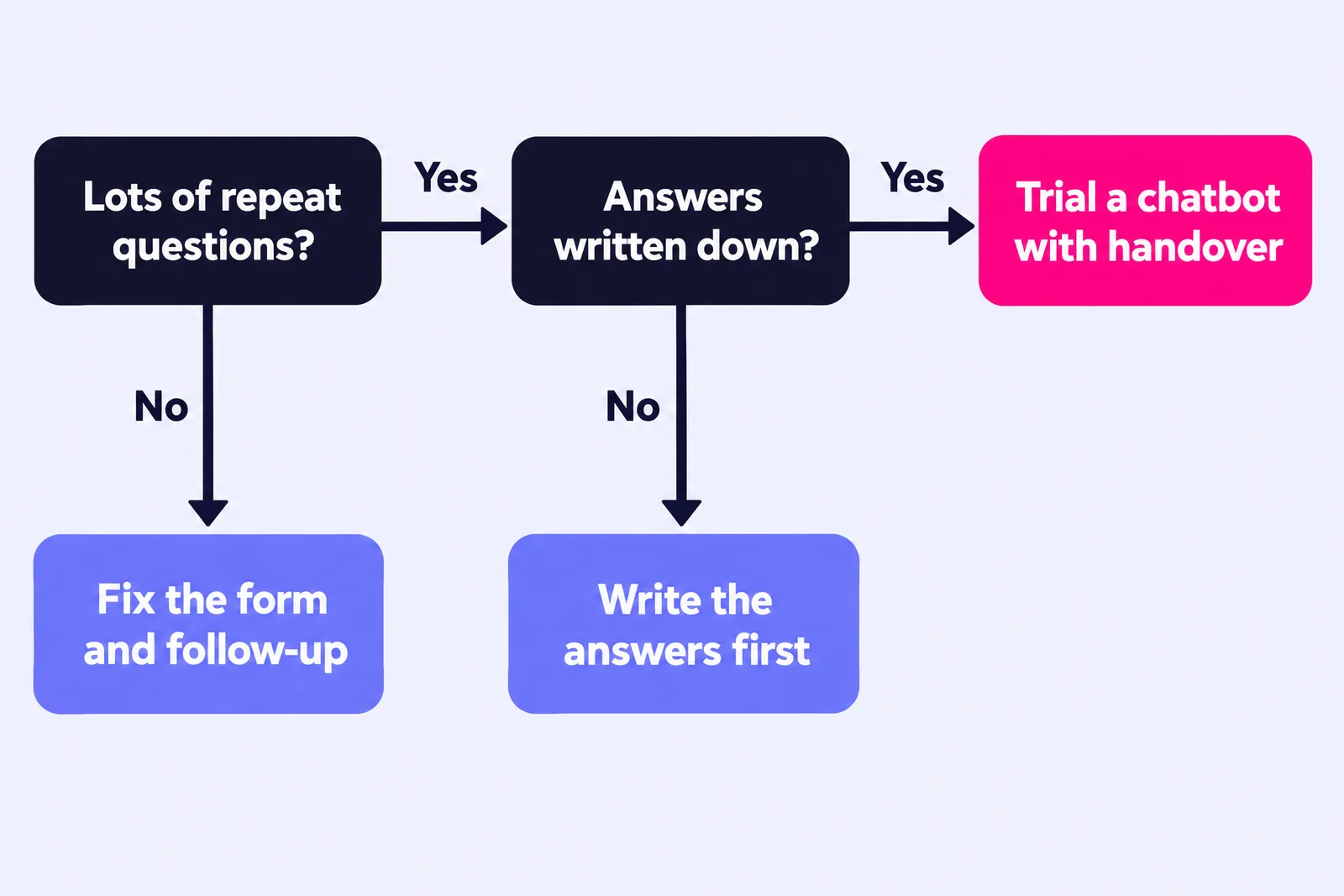
Probably not as your first fix. A chatbot earns its place when your website gets a steady flow of the same questions, the answers are already written down, and people ask them when nobody is around to reply. If your enquiries are fewer, higher value and need a conversation, a sharper contact form and a faster reply will usually win you more work.
The test I use is simple. Do you get the same ten or twenty questions again and again? Could someone new to the business answer them from what is already written down? Do people ask them outside working hours, or in volumes your team struggles to keep up with? Yes to all of those is a good case for a chatbot. Yes to one or none, and the money is better spent elsewhere first.
When does a chatbot actually help?
A chatbot helps when it saves your visitor a wait for an answer that already exists. These are the situations where that tends to be true:
- Repeat questions with fixed answers. Opening hours, delivery areas, what is included in a package, how to book, what to bring to an appointment.
- Out-of-hours demand. Visitors who arrive in the evening or at weekends and would otherwise leave without an answer.
- Self-service tasks. Checking a booking, finding the right product or service, or working out whether they qualify before they enquire.
- A well-kept knowledge base. Modern AI assistants answer from the content you give them. Clear FAQs, policies and service pages make a useful bot; thin or out-of-date ones make a confident, wrong one.
Best for: online shops, booking-led businesses, membership organisations and software products, where the same questions arrive every day and a quick answer keeps the sale moving.
When will a better contact form or faster follow-up do more?
When the problem is what happens around the enquiry itself. For most service businesses, enquiries are lost because the form puts people off or because the reply comes too late, and a chatbot fixes neither.
A tradesperson, an accountant or a consultancy might get a handful of enquiries a week, each worth hundreds or thousands of pounds. Those buyers want to describe their job and hear back from a person quickly, and a bot that questions them first can feel like a barrier. For example, for most trades and professional services companies in Cardiff and South Wales, a short form, a visible phone number and an instant text or email confirming when they will hear back is a better first investment than a chat widget.
Here is how the three options compare:
| Option | What it fixes | Best for | Watch out for |
|---|---|---|---|
| AI chatbot | Instant answers to common questions, at any hour | High volumes of repeat questions with written answers | Wrong answers given with confidence; hiding the route to a person |
| Better contact form | Visitors giving up halfway or sending vague enquiries | Lower volume, higher value service enquiries | Asking for too much too soon; no word on what happens next |
| Faster follow-up | Leads going cold before you reply | Any business where buyers contact more than one supplier | Relying on someone remembering; no out-of-hours acknowledgement |
If enquiries are going cold, start with our guide on why leads go cold and the follow-up system that fixes it. If visitors are not getting in touch at all, the issue is usually further up the page, and why your website isn't converting walks through the common leaks.
What should you check before adding a chatbot?
Check that you can feed it, supervise it and stand behind what it says. Work through this list before you sign up to anything:
- List your top twenty questions. Pull them from your inbox, call notes and reviews. If you struggle to find twenty, you probably do not need a bot yet.
- Write the approved answers. The bot should answer from your content, so the content comes first. This work also improves your FAQ page whether or not you go ahead.
- Decide what it must never answer. Prices that change, quotes, legal, medical or financial advice, and anything that depends on seeing the job. Those go to a person.
- Design the handover. Every conversation needs a clear route to a human: a phone number, a callback request or a form that lands with your team, with the chat transcript attached.
- Connect it to how you work. Leads it captures should land automatically in your CRM or inbox, where your team already works. Our workflow automation projects often start here.
- Name an owner and review it monthly. Someone reads a sample of transcripts, corrects wrong answers and updates the content when your services or prices change.
Where this goes wrong: businesses treat what the bot says as somebody else's problem. In February 2024 a Canadian tribunal found Air Canada liable after its website chatbot gave a customer wrong information about bereavement fares, and the airline had to pay damages (American Bar Association summary). It was a Canadian case, but the principle is a sensible one to plan around anywhere: what your chatbot tells customers, your business has told them.
What are the data protection basics for a website chatbot?
If people type their name, phone number, address or details of their problem into a chat window, you are processing personal data, and UK GDPR applies just as it does to your contact form. Cover these basics:
- Tell people. Update your privacy notice to cover the chatbot: what it collects, why, who provides it and how long you keep transcripts. A short line in the chat window linking to it helps.
- Know your supplier. Find out where conversations are stored, whether they are used to train the supplier's models, and put a data processing agreement in place.
- Collect only what you need. A name and a way to reply is usually enough. Do not invite people to share health, financial or other sensitive details in chat.
- Set a retention period. Delete transcripts you no longer need instead of keeping everything indefinitely.
- Check the cookies. Many chat widgets store information on the visitor's device, and under PECR storage that is not strictly necessary generally needs consent, so the widget belongs in your cookie banner (ICO guidance on cookies and similar technologies).
The ICO's guidance on AI and data protection covers transparency, accuracy and fairness in more depth, and the ICO confirms that all data protection provisions in the Data (Use and Access) Act 2025 are now in force, so check that your privacy notice reflects current law. This is general guidance rather than legal advice; if your chatbot will handle sensitive information, speak to a data protection specialist.