Most business owners I speak to have tried ChatGPT or Copilot by now. Far fewer have anything running quietly in the background that saves them time every working day. That gap is where the real return sits.
Use is spreading fast. The ONS reported in July 2026 that around 35% of UK businesses with ten or more employees now use at least one AI technology, up from about 12% in late 2023, and that 28% of businesses with fewer than ten employees do too. The same ONS work lists difficulty identifying use cases among the most common barriers. This article is meant to fix that one.
Below are twelve automations a small business can realistically set up before the end of the year, grouped by where the time goes: enquiries, quotes, money, reviews, reporting and the inbox. For each one I give the effort involved and the human check I would keep. If you want the bigger picture first, read our guide to where to start with AI and automation. This piece is the practical menu.
What counts as AI automation for a small business?
Automation moves information from one place to another without you touching it. A form submission becomes a CRM record; a finished job becomes an invoice. AI adds the steps that used to need a person to read or write something: summarising an email, pulling a postcode out of a message, drafting a reply in your tone of voice.
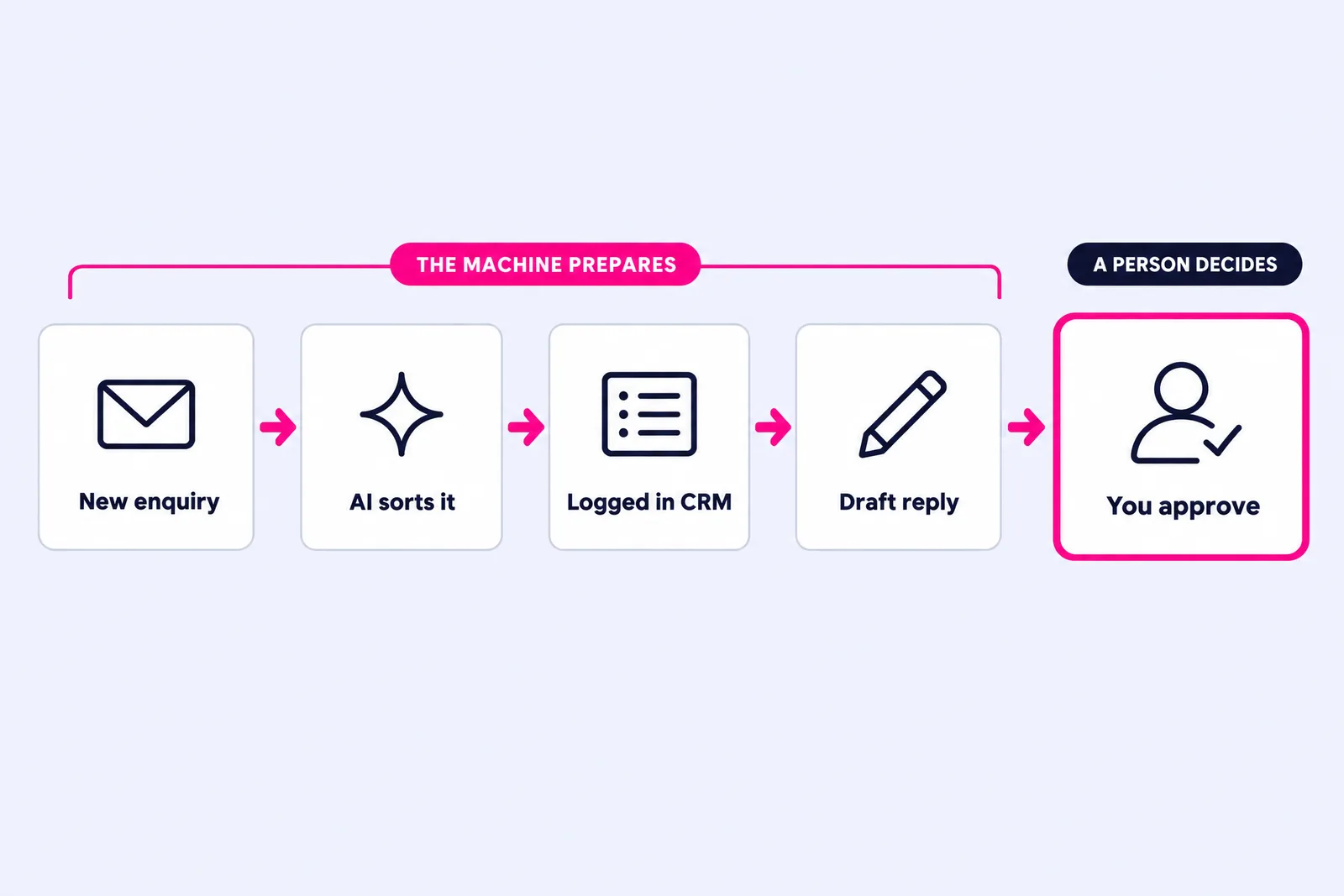
The combination is what makes it useful. A simple rule cannot tell an urgent leak from a general enquiry, and an AI chat window does nothing until you open it. Joined together, a workflow can read the enquiry, sort it, log it and draft the response, then hand it to you to approve.
My rule for every example below: the machine prepares and a person decides. Anything that goes to a customer, commits you to a price or touches money keeps a human check until you have watched it work long enough to trust it. Our practical AI guide for small businesses covers the wider principles if you are new to this.
Which AI automations help with enquiries?
1. Instant enquiry acknowledgement
When a form or email lands, send a reply within a minute that confirms you have it, says when a person will be in touch and asks the one question you always need answered, such as photos of the job, preferred dates or a rough budget. Harvard Business Review research on online sales leads found most companies were not responding nearly fast enough, and my own years in sales taught me the first business to reply properly usually gets the conversation.
Effort: low. Human check: write the message once, then let it run.
2. Enquiry triage and CRM logging
An AI step reads each enquiry, pulls out the service, location, urgency and contact details, and creates a record in your CRM or a shared spreadsheet. Urgent jobs can trigger a text to whoever is on call. It ends the familiar question of whether anyone replied to that enquiry from Tuesday.
Effort: medium, because your categories need thinking through first. Human check: review how it sorted things once a week for the first month.
3. Missed-call text back
For trades, clinics and anyone who works with their hands, a call missed while you are on a job can go straight to the next business on Google. Many business phone systems and VoIP apps can send an automatic text when a call goes unanswered, with a booking link or a promise of a callback.
Effort: low, if your phone system supports it. Human check: keep the text short and make sure someone does call back.
How can AI speed up quotes and follow-up?
4. First-draft quotes
Give an AI model your price list, your standard terms and the notes from a site visit or call, and it drafts the quote in your format. You check the figures, adjust and send. For businesses that quote a lot, this is often where the evenings disappear.
Effort: medium. Human check: every time. A quote is a commitment, so no draft leaves without your approval.
5. Automatic quote chasing
In my experience, the quotes that go quiet are very often the ones nobody chased. Set up a sequence that follows up a couple of days after sending, again a week later, and then asks politely whether to close the file. It stops the moment the customer replies or accepts. Our workflow automation projects start here more often than anywhere else, because it sits closest to revenue.
Effort: low to medium. Human check: write the messages yourself so they sound like you.
Which money and admin tasks can you automate?
6. Invoicing and payment reminders
When a job is marked complete in your job sheet or CRM, create the invoice in your accounting software automatically. Then switch on the payment reminders that Xero, QuickBooks and most of their competitors already include. It costs very little and shows up quickly in cash flow.
Effort: low. Human check: glance over invoices before they go until you trust the data feeding them.
7. Receipt capture and bookkeeping
Photograph or forward receipts and let your accounting software or a capture app read and categorise them. This matters more than it did a year ago. Business Wales explains that Making Tax Digital for Income Tax applies from 6 April 2026 to sole traders and landlords with qualifying income over £50,000, with the threshold dropping to £30,000 from April 2027, and that records must be kept digitally in compatible software.
Effort: low. Human check: your bookkeeper or accountant reviews the categories each quarter.
How do you automate reviews without breaking the rules?
8. Review requests after every job
Trigger a short message with your Google review link once a job is closed or paid, and send it to every customer. Google's own guidance says you can ask customers to review you through a link or QR code, but treats incentives such as discounts in exchange for reviews as fake engagement. UK law adds weight: since 6 April 2025 the Digital Markets, Competition and Consumers Act has banned fake reviews, concealed incentivised reviews and publishing reviews in a misleading way, as CMS sets out. A filter that only sends the link to happy customers sits badly with all of that, so keep it simple and ask everyone.
Effort: low. Human check: none once the message is right.
9. Drafted review replies
Have an AI step draft a reply to each new review, specific to what the customer said, and send it to you for approval. Thoughtful replies show future customers that someone is paying attention.
Effort: low. Human check: always read replies to negative reviews yourself before they post.
What reporting and inbox work can AI take off your plate?
10. A Monday numbers email
Pull new enquiries, quotes sent, jobs won and money owed from your CRM and accounting software into one short email at 7am every Monday, with an AI summary of what changed since last week. I would rather an owner glanced at five numbers every Monday than studied fifty once a quarter.
Effort: medium, depending on how tidy your data is. Human check: sense-check the summary against the figures.
11. Meeting notes into actions
Zoom, Microsoft Teams and Google Meet all offer AI meeting summaries. Take it one step further: pass the summary to an automation that pulls out the actions, adds them to your task list or CRM, and drafts the follow-up email to the client. We record our own client calls on Zoom partly for this reason.
Effort: low to medium. Human check: approve the follow-up before it goes, and tell everyone on the call that it is being recorded.
12. Inbox sorting and draft replies
Copilot in Outlook and Gemini in Gmail can already summarise long threads and draft replies. An automation layer can go further: label incoming mail by type (customer, supplier, invoice, junk), file attachments where they belong, and queue draft answers to routine questions such as service areas, opening hours or what happens on the day.
Effort: low to medium. Human check: you press send on anything going to a customer.
Which tools do you need, and what will it cost?
Most of these run on software you already pay for, plus a connector tool to join the pieces together. Zapier is the best known. According to Zapier's pricing page in October 2026, its free plan covers 100 tasks a month on two-step workflows, and the Professional plan starts at $19.99 a month with multi-step workflows included. Make and n8n are worth comparing. Add an AI model such as ChatGPT, Claude, Copilot or Gemini for the reading and writing steps.
| Area | Examples | Effort | Human check |
|---|---|---|---|
| Enquiries | Instant reply, triage, missed-call text | Low to medium | Light, after set-up |
| Quotes | First drafts, follow-up sequence | Medium | Every quote |
| Money | Invoices, reminders, receipts | Low | Periodic review |
| Reviews | Requests, drafted replies | Low | Negative replies |
| Reporting | Monday numbers, meeting actions | Medium | Sense-check |
| Inbox | Sorting, draft answers | Low to medium | Before sending |
If you would rather have it built and looked after, our AI & Automation packages start with Spark at £500. Backbone is £1,200 plus £250 a month, and Autopilot is £2,500 plus £450 a month, for businesses connecting several systems at once.
How should you choose your first three automations this quarter?
Resist the urge to build all twelve. Pick three: one that brings money in faster, one that gets you paid faster and one that hands you back an hour a week. For most service businesses that means quote chasing, payment reminders and either inbox sorting or meeting notes.
Then work in short loops. Map how the task happens today, on paper. Build the simplest version that could work. Run it alongside the manual process for a fortnight. Measure the single number it should move, such as quotes followed up, days to get paid or emails cleared before lunch. Add the next automation only once the first is earning its keep.
If you run a business in Cardiff or elsewhere in South Wales and want to be able to build and judge these yourself, that is what our one-to-one AI training for founders covers, on Zoom, at your office or at ours in Pontcanna. Either way, the businesses that get the most from AI this year will be the ones that made a few small, boring jobs run on their own.