


In plenty of small businesses, someone is already using a personal ChatGPT account for work, and someone else has noticed a Copilot button appear in Outlook. Picking one properly matters, because the choice decides where your business data goes, what you pay each month and whether the AI sits inside the work or off to one side of it.
This guide compares ChatGPT and Microsoft Copilot for a small business in plain terms: current UK prices, how each handles your data, how each fits with Microsoft 365 or Google Workspace, and the everyday jobs each does well. It ends with a decision table by business type. If you want your team using whichever you pick properly from week one, our one-to-one AI training for founders covers exactly that, on Zoom or in person in Cardiff.
What is the difference between ChatGPT and Copilot?
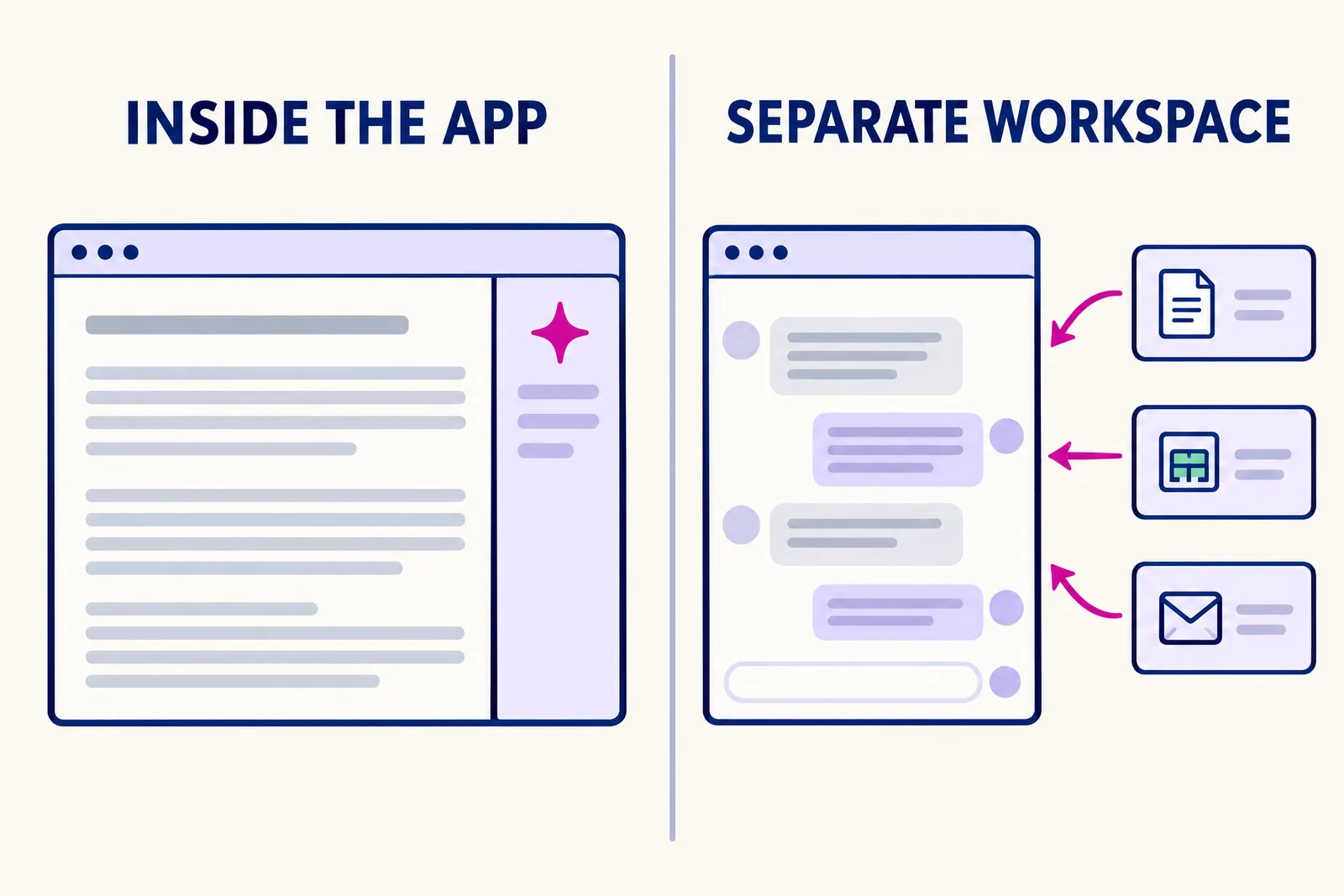
ChatGPT is a standalone AI workspace you go to; Microsoft 365 Copilot is AI built into the Microsoft apps your team already works in. Both can draft, summarise, analyse and answer questions. What separates them is where the work happens and what the tool can see.
ChatGPT, made by OpenAI, is a chat app on the web, desktop and phone. You bring the work to it: paste text, upload a file, or connect apps such as Google Drive, SharePoint or Outlook so it can look things up. On the Business plan an admin manages those connections, and OpenAI's help centre lists the apps ChatGPT can connect to.
Copilot is Microsoft's name for its AI assistant, and the name covers several products, which is where most of the confusion starts. The one that matters for a business is Microsoft 365 Copilot. With a paid licence it sits inside Word, Excel, PowerPoint, Outlook and Teams, and it can draw on your work email, files and meetings. There is also an included tier, Microsoft 365 Copilot Chat, which many Microsoft 365 business users already have.
Worth knowing: the consumer Copilot app you sign into with a personal Microsoft account is a different product from Microsoft 365 Copilot, and only the business versions come with Microsoft's enterprise data protection. When someone in your team says they use Copilot, check which one.
What are the options for a small business?
There are four realistic options for a small team, and one of them may already be included in what you pay. Here is each one, answered the same way.
ChatGPT Plus (personal)
- What it is: a personal ChatGPT subscription for one person.
- Best for: a sole trader trying AI for the first time.
- Watch out for: on personal plans, OpenAI may use your conversations to train its models unless you switch that setting off, and the business has no admin control over the account or what is in it.
- Cost: £20 a month, per OpenAI’s UK pricing page.
ChatGPT Business
- What it is: OpenAI's team plan, with a shared workspace, admin controls and connected apps.
- Best for: teams that want one AI workspace across a mix of tools, or Google Workspace teams who prefer ChatGPT.
- Watch out for: it sits beside your office apps rather than inside Word or Gmail, so people still move work in and out of it.
- Cost: £15 per seat a month billed annually, per OpenAI, or £18 billed monthly for two or more users, according to this UK price round-up.
Microsoft 365 Copilot Chat (included)
- What it is: secure, web-grounded AI chat that Microsoft includes at no additional cost for users with an eligible Microsoft 365 subscription.
- Best for: Microsoft 365 businesses that want to start safely this week without buying anything.
- Watch out for: it does not work across your mailbox, Teams and SharePoint the way the paid version does, and full Copilot inside Word, Excel, PowerPoint and Teams needs a paid licence.
- Cost: included with eligible plans.
Microsoft 365 Copilot Business
- What it is: the paid Copilot licence for smaller businesses, added to a Microsoft 365 business plan. It brings Copilot into Word, Excel, PowerPoint, Outlook and Teams, AI chat grounded in your work data, pre-built agents for research and data analysis, and adoption reporting.
- Best for: teams that spend their day in Outlook, Teams and Office files.
- Watch out for: it is only as useful as your files are organised; if documents are scattered across personal drives and attachments, it has less to work with.
- Cost: Microsoft’s UK pricing page lists it from £16.10 per user a month on an annual plan, with a promotional price from £13.80 between 1 July and 31 December 2026, or £19.32 billed monthly, all excluding VAT.
Where this goes wrong: buying paid seats for the whole team before anyone has a clear use for them. Start with the included tier or a handful of seats, and add more when usage proves the case.
How much do ChatGPT and Copilot cost in the UK?
The paid business tiers cost a similar amount per person, and the cheapest sensible starting point is often the AI already included in your Microsoft 365 or Google Workspace plan. The prices below were checked in November 2026 on the sources linked above; Microsoft's exclude VAT, and OpenAI's page does not say, so check the total at checkout.
| Plan | Price per user a month | Billing | Business data protection | Works inside your office apps |
|---|---|---|---|---|
| ChatGPT Plus | £20 | Monthly | Personal terms; training on unless switched off | No |
| ChatGPT Business | £15 (£18 billed monthly) | Annual or monthly | Not used for training by default | Connects to them from outside |
| Microsoft 365 Copilot Chat | Included with eligible plans | Part of your Microsoft 365 plan | Enterprise data protection | Outlook and the Copilot app |
| Microsoft 365 Copilot Business | From £16.10 (promotional £13.80 until 31 December 2026); £19.32 billed monthly | Annual or monthly | Enterprise data protection | Yes: Word, Excel, PowerPoint, Outlook and Teams |
Two more things to budget for. Copilot Business is an add-on to a Microsoft 365 business plan, so it sits on top of what you already pay. And whichever you choose, the biggest cost is the time it takes your team to get good with it. A licence nobody uses properly is the most expensive line on this table.
Which is safer for your business data?
On their business plans, both are built for company data; the real risk sits with personal accounts. ChatGPT Business, Microsoft 365 Copilot Chat and Copilot Business all come with business data terms. Personal ChatGPT plans do not.
- ChatGPT Business: OpenAI says it does not train its models on business data by default, encrypts data at rest and in transit, aligns with SOC 2 Type 2 criteria and will sign a Data Processing Addendum to support GDPR. Storing data at rest in Europe or the UK is offered to eligible Enterprise customers.
- Microsoft 365 Copilot: Copilot Chat inherits your existing Microsoft 365 security and compliance settings, keeps data in your region and covers prompts and responses under the same contractual terms as your Exchange email and SharePoint files.
- Personal ChatGPT (Free, Plus, Pro): OpenAI may use conversations to train its models unless the user turns off Improve the model for everyone, as its help centre explains.
The practical step that matters most is a one-page rule for your team: which tool is approved, what can go into it (client names, financials, personal data) and what must stay out. Then move any work sitting in personal accounts into the business tool.
Worth knowing: Copilot works within the permissions already set in Microsoft 365, so if SharePoint sharing is loose, it can surface files people technically had access to but never knew about. Tidy your sharing settings before you switch it on.
How do they fit with Microsoft 365 or Google Workspace?
Start with where your email and files already live, because that settles most of the decision.
If you run on Microsoft 365
Copilot has the home advantage. Copilot Chat may already be available to your team at no extra cost, and the paid licence puts AI into the documents, inboxes and Teams meetings people use all day, grounded in your own files. ChatGPT Business can connect to SharePoint, Outlook and Teams too, but it works from outside those apps, so the habit becomes copying results back in.
If you run on Google Workspace
Paid Microsoft 365 Copilot makes little sense without Microsoft 365. The real comparison is ChatGPT Business against Gemini, which Google includes in its Workspace business plans: the Gemini app and Gemini in Gmail on every business plan, and Gemini in Docs and Sheets from Business Standard upwards, according to Google’s UK pricing page. ChatGPT Business connects to Google Drive and Gmail, so a team that prefers ChatGPT can still use it with their own files.
If you use a mix of tools
ChatGPT Business is the more neutral choice. It connects to a wide range of tools from one workspace and does not assume you have bought into one office suite. That suits a business with Google email, Office files from clients and a separate CRM.
Which everyday tasks does each handle well?
Both handle everyday writing and thinking work well; the gap shows in tasks that depend on your own email, meetings and documents.
| Task | ChatGPT Business | Microsoft 365 Copilot (paid) |
|---|---|---|
| Drafting proposals, emails and posts | Strong, drafted in its own workspace and copied across | Strong, drafted inside Word or Outlook |
| Summarising a long email thread | Possible with Outlook or Gmail connected | Built into Outlook |
| Meeting notes and actions | Works from notes or a transcript you give it | Catches you up on Teams meetings |
| Analysing a spreadsheet | Strong: upload the file and ask questions | Works inside Excel |
| Researching a topic or competitor | Web search and deep research | Pre-built research agent with the paid licence |
| A reusable assistant for one job | Custom GPTs and shared projects | Agents, some included and some metered |
Treat the table as a guide to fit. Both products change often, and for a small team the model underneath matters far less than whether people use the tool on real work every week. For ideas on where to point it first, our list of AI automation examples for small businesses is a good place to start.
Which should your business choose?
Choose by where your team works and how organised your files are. The table covers the most common small business set-ups.
| Your business | Start with | Why |
|---|---|---|
| Sole trader or freelancer | ChatGPT Plus with training switched off, or the AI already in your office suite | Cheapest way in, and no admin needed for one person |
| Small team on Microsoft 365, files organised in SharePoint and OneDrive | Copilot Chat now, then Copilot Business for the heaviest users | AI inside the tools they already use, under data terms you already have |
| Small team on Microsoft 365, files scattered across drives and attachments | Copilot Chat plus a file tidy-up, then decide | Paid Copilot earns its keep when it can find your files |
| Team on Google Workspace | Gemini in Workspace first; ChatGPT Business if the team prefers it | Gemini is already in the plan, and ChatGPT Business connects to Drive and Gmail |
| Mixed tools, for example Google email, Office files and a separate CRM | ChatGPT Business | One workspace that connects to several tools |
| Regulated or client-confidential work, such as legal, finance or health | The business tier of your existing suite, after checking terms with your adviser | Keeps data inside contracts and controls you already rely on |
If you are still torn, run each with two or three people for a month and compare what they actually used it for. That tells you more than any feature list. For a wider view of where AI fits in a small business, read our practical AI guide for small businesses.
How do you roll it out without wasting money?
Start small, set rules early and train people on their own work. A month-long pilot with a few people costs little and shows you where the value is.
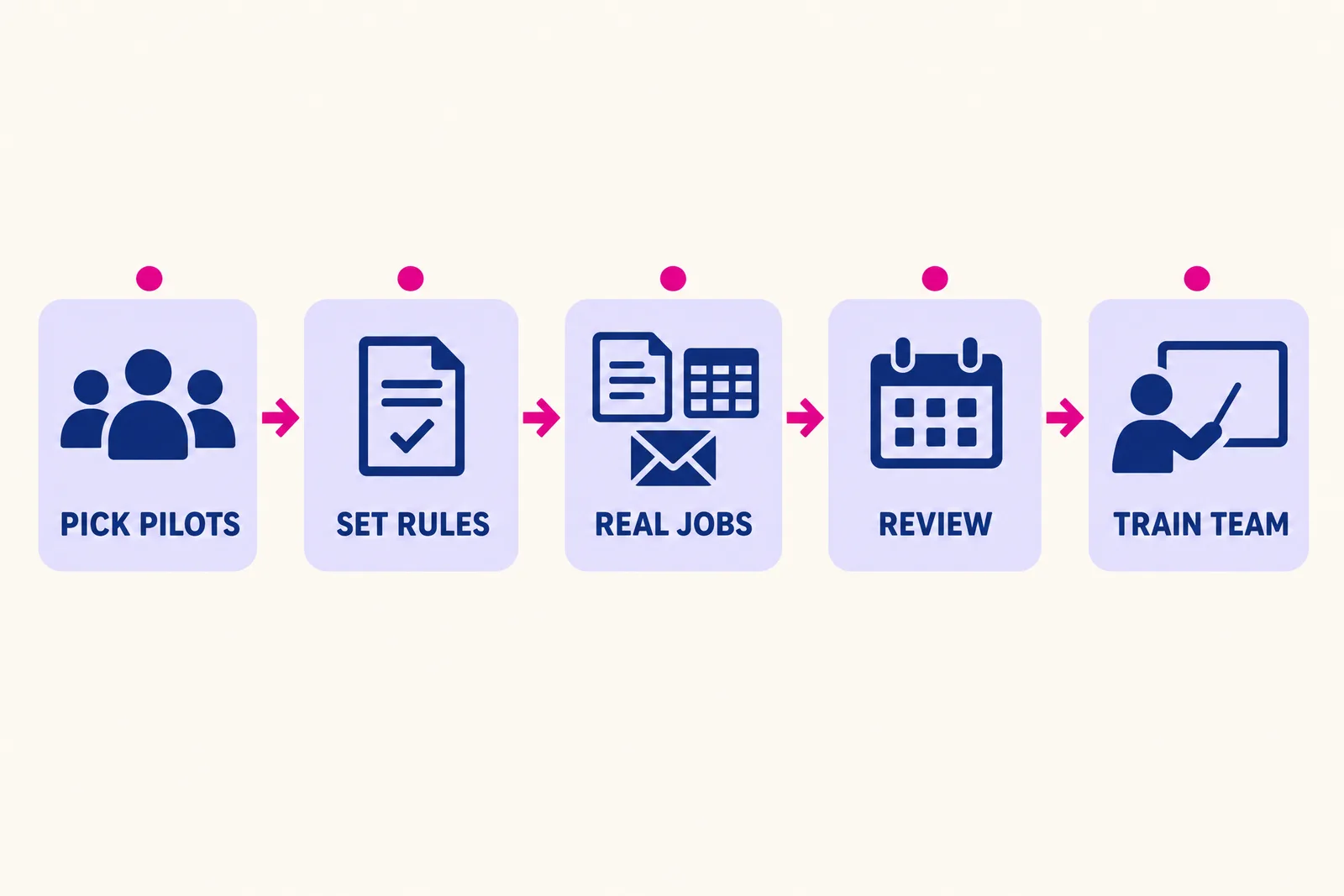
- Pick two or three people who write, quote or report the most, and give them the business tier for a month.
- Write the one-page rule: the approved tool, what can and cannot go into it, and who to ask when unsure.
- Give each person three real jobs to try it on, such as a proposal, a monthly report and an inbox clear-out.
- At the end of the month, keep the paid seats that earned their place and move everyone else to the included tier.
- Train the wider team on writing good prompts, checking what comes back and the jobs that matter most in your business.
The last step is where most of the return comes from. A tool people half understand gets used for the odd email; a tool people are trained on becomes part of how quotes, reports and follow-ups get done. If you are deciding where AI should sit across the whole business, our guide to where to start with AI and automation walks through the order we recommend.