


Most website redesigns are judged on how the new site looks. The ones that go wrong usually go wrong earlier, in the weeks before anyone opens a design file: nobody wrote down what the old site was earning, nobody mapped the old pages to the new ones, and nobody checked that the enquiry form still reached the right inbox on launch day.
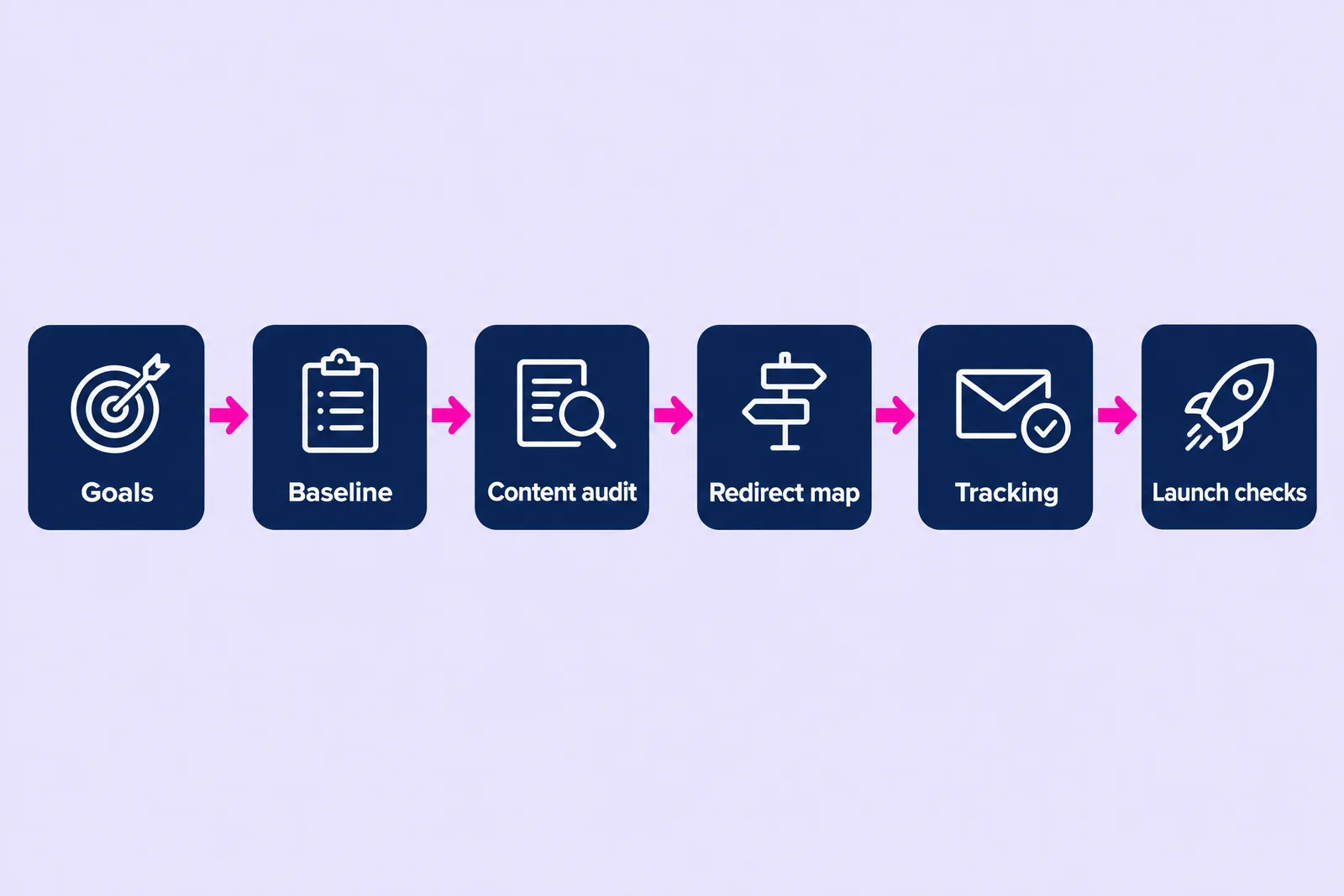
This checklist covers what to sort before a redesign starts, in the order I work through it: goals, a baseline, a content audit, a redirect map, tracking and launch checks. It applies whether you are briefing an agency, a freelancer or your own team. If you are still weighing up how to pay for the new site, our website packages show what a fixed-scope build includes.
What should you sort before a website redesign starts?
Sort six things before design starts: the goal, a record of how the current site performs, a decision on every existing page, a map of where old URLs will point, enquiry tracking and a launch plan. Each one protects something the old site has already earned.
The order matters. Goals decide which pages are worth keeping. The baseline tells you which pages bring in visits and enquiries. The content audit decides what happens to each page, and those decisions become the redirect map. Tracking has to exist before launch so you can compare like with like, and the launch checks catch the small mistakes that cost the most.
- Goals: what the new site must do better, in one or two measurable lines.
- Baseline: traffic, rankings and enquiries from the current site, exported and saved.
- Content audit: keep, improve, merge or remove for every page.
- Redirect map: every old URL that earns visits or links, matched to its new home.
- Tracking: form submissions, calls and email clicks recorded as key events in GA4.
- Launch checks: a short list for the day before, launch day and the fortnight after.
If you have not yet decided whether you need a redesign at all, start with the signs you need a new website, then come back to this list.
How do you set goals for a website redesign?
Write down the commercial result the new site must improve, then choose one or two numbers you will judge it by. A goal such as more enquiries from the services pages gives you something to measure and a reason to keep or cut each page. A fresher look is worth having too, though on its own it gives nobody a way to decide what stays.
Useful redesign goals tend to come from three places:
- Enquiries: how many arrive through the site each month, and from which pages. If you do not know, that is the first gap tracking needs to close.
- Quality: whether the right customers are getting in touch. A site that attracts small jobs when you want larger contracts has a positioning issue the redesign should address.
- Effort: how much time the current site costs you. Updating a page, adding a case study or changing a price should not need a developer.
Agree who signs off decisions before the project starts. Redesigns slow down when approval sits with a group that has never agreed what the site is for, so name one decision-maker and consult the others. Once the goals are clear, put them in your brief: our guide on how to brief your web designer covers what else that document needs.
What should you record about your current site before anything changes?
Export a snapshot of how the current site performs in Google Analytics 4 and Google Search Console, and save it somewhere the redesign cannot touch. Without it, nobody can say for certain whether the new site is doing better or worse.
The baseline worth keeping:
- Top pages by organic visits over the last twelve months, from GA4 or Search Console.
- Top search queries and the pages that rank for them, from the Search Console Performance report.
- Enquiries by source and page, if you track them. If you do not, note roughly how many enquiries arrive each month by form, email and phone.
- Pages with links from other websites, from the Links report in Search Console. These carry authority you do not want to throw away.
- Page experience, from the Core Web Vitals report in Search Console, so you can show the new site is quicker.
- A full list of URLs, from your sitemap or a crawl. This becomes the first column of your redirect map.
Worth knowing: GA4 keeps detailed event data for two months by default, and that setting limits what you can analyse in Explorations. InfoTrust's guide to GA4 data retention recommends changing it to 14 months, which takes a minute in the Admin area under Data collection and modification. Do it now, before the redesign, so you have a longer comparison window afterwards.
How do you audit your existing content before a redesign?
Go through every page on the current site and give it one of four decisions: keep, improve, merge or remove. Base each decision on the baseline, your goals and whether the page still describes what you sell.
| Decision | When to use it | What happens to the URL |
|---|---|---|
| Keep | The page earns visits, links or enquiries and is still accurate | Keep the same URL if you can; if it has to change, redirect it |
| Improve | The topic matters but the page is thin, dated or unclear | Keep the URL and rewrite the content |
| Merge | Several pages cover the same thing and compete with each other | Combine them into one page and redirect the others to it |
| Remove | The page earns nothing and no longer fits what you offer | Redirect it to the closest relevant page, or let it return a 404 if nothing fits |
Where this goes wrong: the new design arrives with fewer pages because a smaller site looks tidier, and service pages that brought in steady enquiries quietly disappear. Every page that ranks for a search your customers make deserves a deliberate decision before anyone trims the menu.
The audit is also the right moment to test your content against your goals. If you want larger jobs, the service pages need to speak to the people who commission them. If enquiries have stalled despite decent traffic, read why a website gets traffic but no enquiries before you brief the new design, because the same problems can follow you to a new site.
How do you stop a redesign losing your Google rankings?
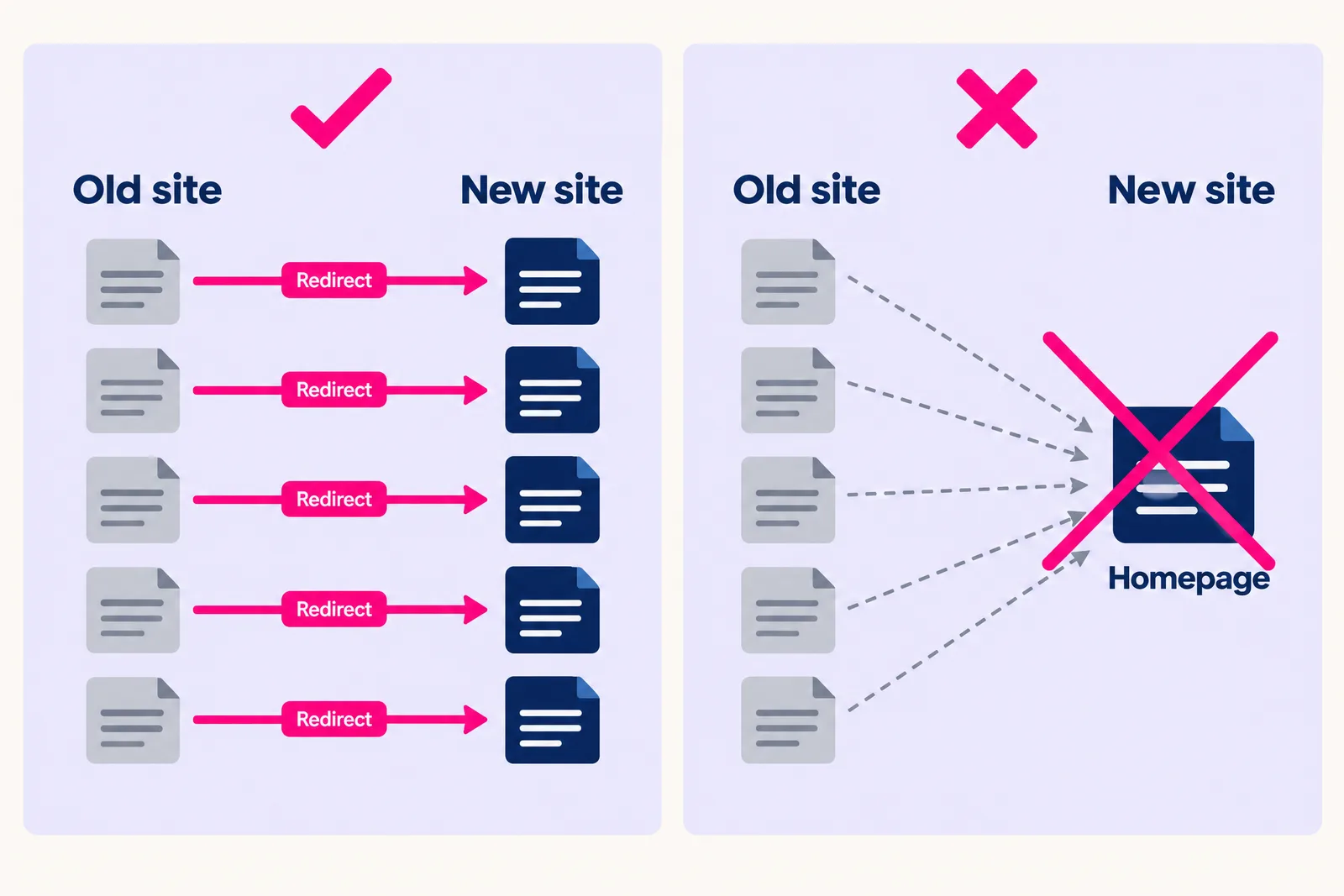
Map every old URL that earns visits or links to its closest new page, and set up permanent (301) redirects before launch. When rankings fall after a redesign, the usual cause is old URLs that stop working, leaving the signals they built up with nowhere to go.
Google needs to see a redirect several times before it records the change. As Search Engine Journal reported, Google's John Mueller recommended keeping redirects in place for at least one year. Treat that as a minimum, and leave them in place for good unless there is a clear reason to remove them.
A redirect map is a simple spreadsheet with three columns: the old URL, the new URL and a note on why. Build it from the URL list in your baseline and the decisions from your audit, then follow these rules:
- Match like for like. An old boiler repair page should point to the new boiler repair page. Sending every old URL to the homepage throws away the relevance each page had built.
- Avoid chains. Point old URLs straight at their final destination, including any redirects left over from earlier redesigns.
- Update internal links so the new site links directly to new URLs rather than relying on redirects.
- Submit a new XML sitemap in Search Console once the site is live.
- Changing domain as well? Use the Change of Address tool in Search Console. Google's help page says to keep redirects for at least 180 days, and longer while Search still sends traffic to them. Google also updated its site move guide in June 2026 to say every variant of the old domain, including www and non-www, needs a request, as PPC Land reported.
Expect some movement in rankings while Google recrawls a site whose URLs have changed, even with a clean redirect map. What you want to avoid is the sharp, lasting drop that follows broken or missing redirects. The same applies in AI search: if a page an AI assistant has been quoting starts returning an error, it has nothing to point people to.
What tracking should be in place before launch?
Track every way a customer can get in touch (form submissions, taps on your phone number and clicks on your email address) as key events in GA4, and test each one on the new site before it goes live. If you cannot count enquiries, you cannot show whether the redesign worked.
- Forms: record an event on a successful submission, ideally from a confirmation message or thank-you page, so failed attempts are not counted.
- Calls: track taps on click-to-call links. If phone is your main channel, ask your developer about call tracking, and keep the number on your Google Business Profile consistent with the site.
- Email: track clicks on email links.
- Search Console: check the property stays verified after launch, because a new build can drop the verification tag.
- Google Business Profile: check the website link points to the right page on the new site.
Then send a test enquiry through every form and confirm it lands in the inbox or CRM it should. It sounds obvious. It is also the check most often skipped on launch day.
What should you check before and after launch?
Run a short checklist the day before launch, on launch day and for the fortnight after. Most launch problems are small settings left over from the build, and they are quick to fix if someone is looking.
The day before
- Every redirect in the map tested, each returning a 301 to the right page.
- Every form tested end to end.
- Page titles and meta descriptions written for every key page rather than left as defaults.
- Mobile layout checked on a real phone.
- Analytics code present on every page template.
Launch day
- The noindex or "discourage search engines" setting from the staging site switched off.
- robots.txt allowing the pages you want found.
- New XML sitemap submitted in Search Console.
- A test enquiry sent from the live site.
The fortnight after
- Search Console checked for crawl errors and pages Google cannot index.
- 404 errors reviewed and any missed redirects added.
- Enquiries compared with the baseline, week by week.
- Top pages and queries compared with the export you saved.
Where should a business that relies on local customers start with a redesign?
Start with the pages and listings that bring in local enquiries: your Google Business Profile, your location or area pages, and any service page that ranks for a service plus a place name. These are often the pages that matter most commercially, and they are easy to lose in a redesign.
For example, for most companies in Cardiff and South Wales, that means the pages targeting searches such as a service plus Cardiff, Penarth or the Vale of Glamorgan. Keep those URLs where you can, keep your business name, address and phone number identical across the site and your Google Business Profile, and make sure the profile's website link works on launch day.
Done carefully, a redesign can be the point where local search starts working harder. The new site we built for Pest & Property Solutions, a Cardiff pest control company, went live in June 2026 and brought in 112 enquiries in its first 36 days, with 82.7% of them coming from Google organic search. Those figures are our own first-party data from the project.